VALID DIGITAL CRICE CARD:

  • All company representatives (pharmaceutical, IVD, surgical, device, health technology etc) must have a valid digital access card. 
  • A valid digital access card only appears on your CRICE CAMS app if all 4 steps have been completed, including all updates.
  • When there are updates, your digital access card is revoked until completion of updates.
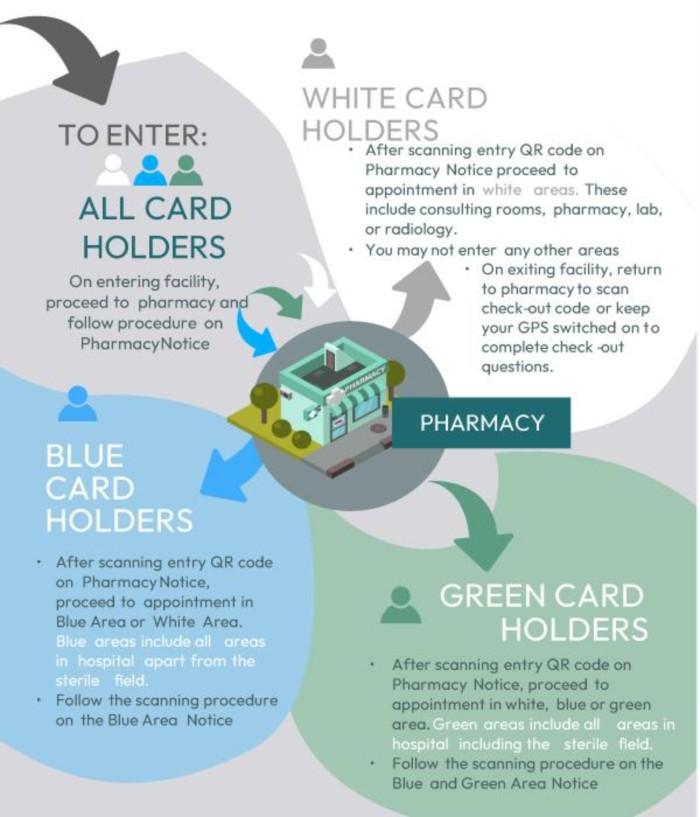
  • Open CRICECAMS app & grant permission to access your location and follow the pop-up instruction to proceed to the pharmacy.
  • Click on the Digital CRICE Access Card button which opens the camera.

HOW TO TROUBLESHOOT IF YOU HAVE A VALID CARD BUT ARE UNABLE TO SCAN

1. You may not have given permission for the CRICE CAMS app to access GPS Location and/or camera. Access is only required at the point of scanning and not before or after.
2. Refresh your app by logging out. Click the burger menu bar on top left of screen and then log-out icon (bottom left).
3. You require an internet connection at the time of scanning but if signal is poor, your scan will reflect later when signal improves.
4. You are attempting to enter this facility within 24 hours of scanning a check-in code without having scanned a check-out code.
5. If you receive a ‘Criteria for Access Not Met’ it could be an attempt to breach level of access.
6. The phone has dull lighting or is tilted when scanning
7. There may be dust/smudges on the camera lens of your mobile device.


8. You may have an older version of the CRICE CAMS app, please remove cache and then uninstall and reinstall by scanning the QR code.

9. Please use the HelpBot found on every CRICE Application by clicking on the ‘Need Help?’ button to assist you in real time

Use our friendly CRICE HelpBot

On web


In app

Click the 'Help' button on the bottom right corner of every screen

Via WhatsApp


 ‎067 145 2378


In app

If further assistance is required, use the "Contact Us" feature on the App

If above does not resolve your query, then email cricecams@masoom.co.za

Our Privacy Statement, as required by the Protection of Personal Information Act, 2013 (POPIA) is available under the Dashboard tab in learner, POC and HPOC desktop applications and https://masoom.co.za/privacy-notice/

©2025 Crice. All rights reserved.